How Werkbook Works: A Deep Dive into a Pure Go Spreadsheet Engine
Spreadsheets are everywhere. They power business operations, financial models, scientific data analysis, and countless other workflows. Yet when developers need to work with .xlsx files programmatically, they often reach for libraries that are either incomplete, bloated with dependencies, or lack one critical feature: the ability to actually evaluate formulas.
Werkbook takes a different approach. It’s a pure Go library — zero external dependencies — that can read, write, and calculate XLSX spreadsheets. This post takes you deep inside its architecture, from the two-layer design that cleanly separates concerns, to the bytecode virtual machine that powers its formula engine, to the dependency graph that makes incremental recalculation possible.
The Big Picture: Two Layers, One Goal
Werkbook’s architecture is built around a clean separation of concerns. At the highest level, there are two layers:
-
The Public API Layer — the types you interact with as a developer:
File,Sheet,Row,Cell,Value. These use 1-based indexing (spreadsheet-style) and provide an intuitive interface for working with spreadsheet data. -
The OOXML Layer — the serialization engine that translates between the in-memory model and the actual
.xlsxfile format (which is really a ZIP archive containing XML documents).
Between these two layers sits the Formula Engine, a self-contained subsystem with its own lexer, parser, compiler, and virtual machine. It’s the heart of what makes werkbook more than just an XML shuffler.
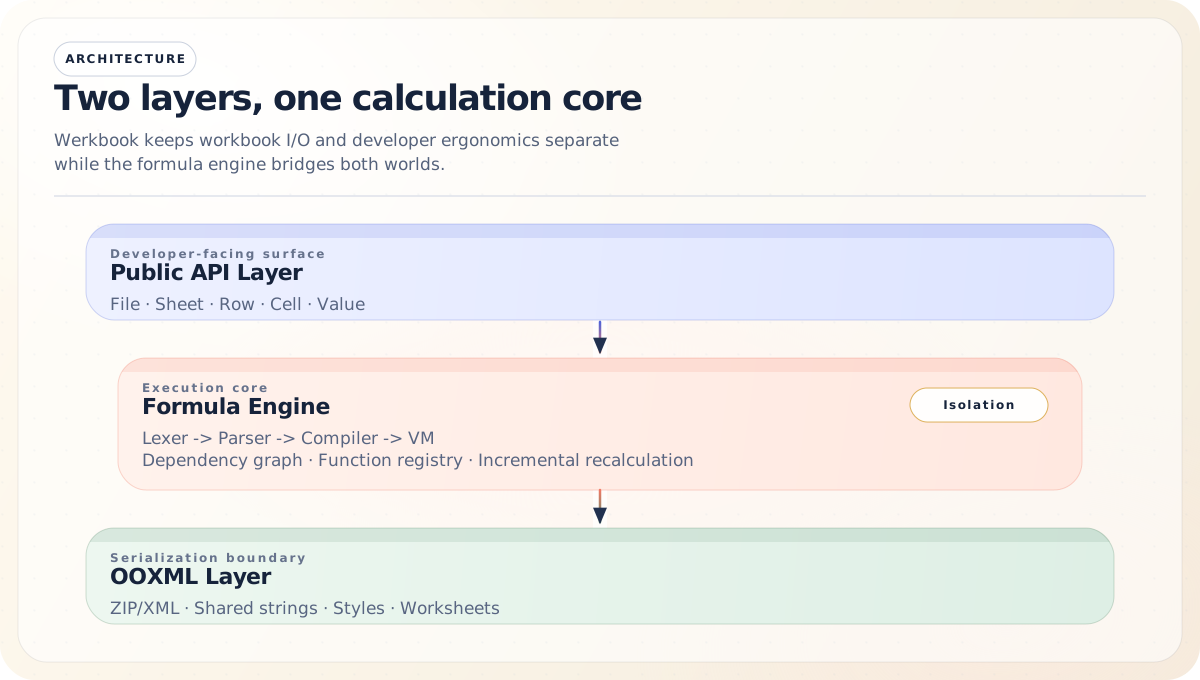
Let’s work through each of these in detail.
The In-Memory Model
When you open or create a workbook in werkbook, you’re working with a tree of Go structs that represent the spreadsheet in memory.
File: The Workbook Container
The in-memory object tree looks like this:
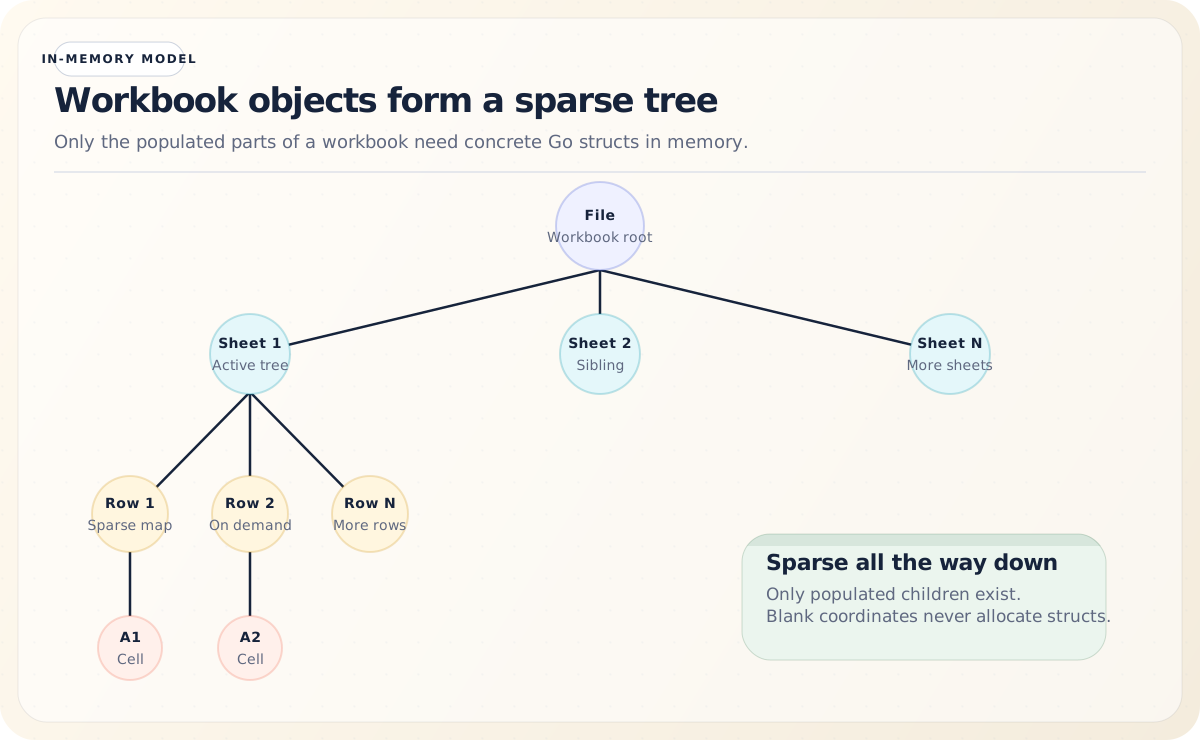
The File struct is the root of everything:
type File struct {
    sheets         []*Sheet
    sheetNames     []string
    date1904       bool
    calcProps      CalcProperties
    coreProps      CoreProperties
    calcGen        uint64
    evaluating     map[cellKey]bool
    deps           *formula.DepGraph
    tableDefs      []Table
    tables         []formula.TableInfo
    definedNames   []formula.DefinedNameInfo
}
A few things stand out here:
-
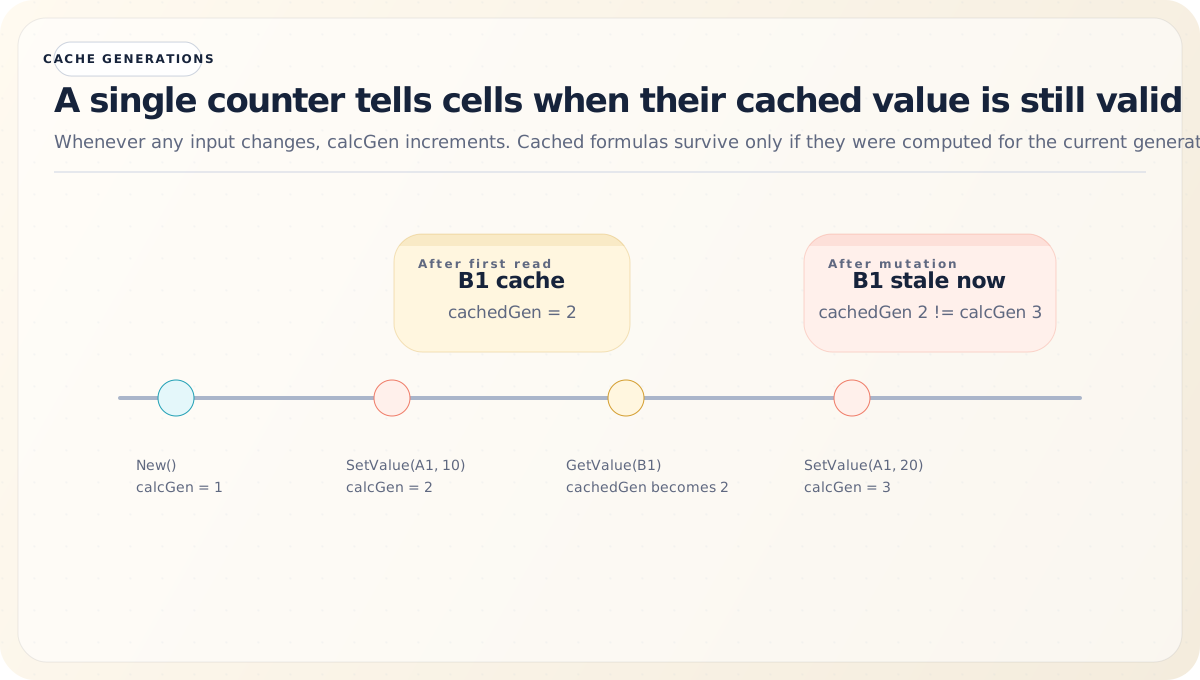
calcGenis a generation counter that starts at 1 and increments every time any cell is mutated. This is the backbone of lazy recalculation — a cell’s cached value is valid only if itscachedGenmatches the file’scalcGen. -
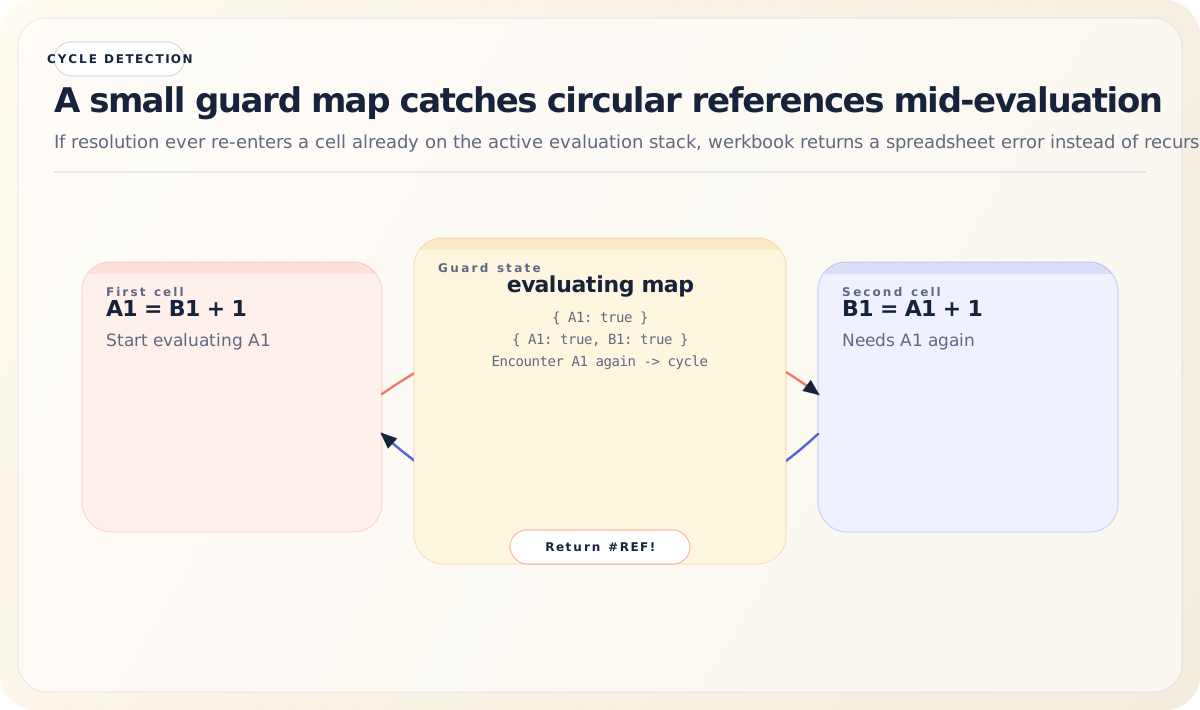
evaluatingis a map used for circular reference detection. When a formula is being evaluated, its cell key is added to this map. If the evaluator encounters that same key again during resolution, it knows it has hit a cycle and returns a#REF!error. -
depsis the dependency graph that tracks which formula cells depend on which data cells, enabling incremental recalculation.
Sheet, Row, and Cell: Sparse by Design
Sheets use sparse data structures — maps rather than dense arrays:
// Conceptually:
Sheet.rows = map[int]*Row    // row number → Row
Row.cells  = map[int]*Cell   // column number → Cell
This means a sheet with data in A1 and Z1000 doesn’t allocate memory for the 25,998 empty cells between them. Compare dense vs. sparse storage:
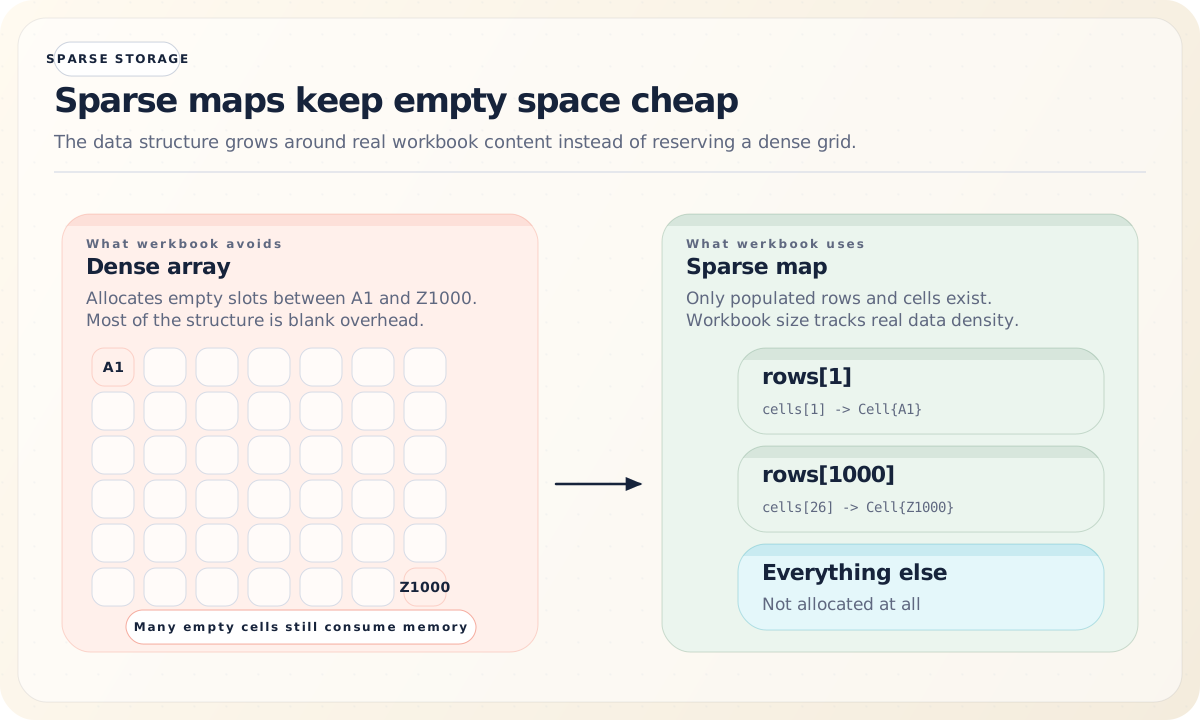
It’s a natural fit for the way real spreadsheets are used, where data tends to cluster in specific regions.
Each Cell holds its value, its formula text (if any), a compiled formula (lazily computed), the generation at which its cached value was computed, a dirty flag for dependency-based invalidation, and an optional style:
type Cell struct {
    col            int
    value          Value
    formula        string
    isArrayFormula bool
    formulaRef     string
    compiled       *formula.CompiledFormula
    cachedGen      uint64
    dirty          bool
    style          *Style
}
The Value Type: A Tagged Union
Werkbook’s Value type is a tagged union that can hold any of the types a spreadsheet cell can contain — numbers, strings, booleans, errors, dates, and the empty value. Rather than using Go interfaces (which would require heap allocation for every cell value), it uses a struct with a type tag:
This approach avoids boxing primitive types into interfaces, which keeps memory allocation tight — an important consideration when a workbook can contain millions of cells.
Reading XLSX Files: Unzipping the Onion
An .xlsx file is a ZIP archive containing a specific structure of XML documents. When you call werkbook.Open("file.xlsx"), the OOXML layer handles the unglamorous but essential work of parsing this structure.
The OOXML File Structure
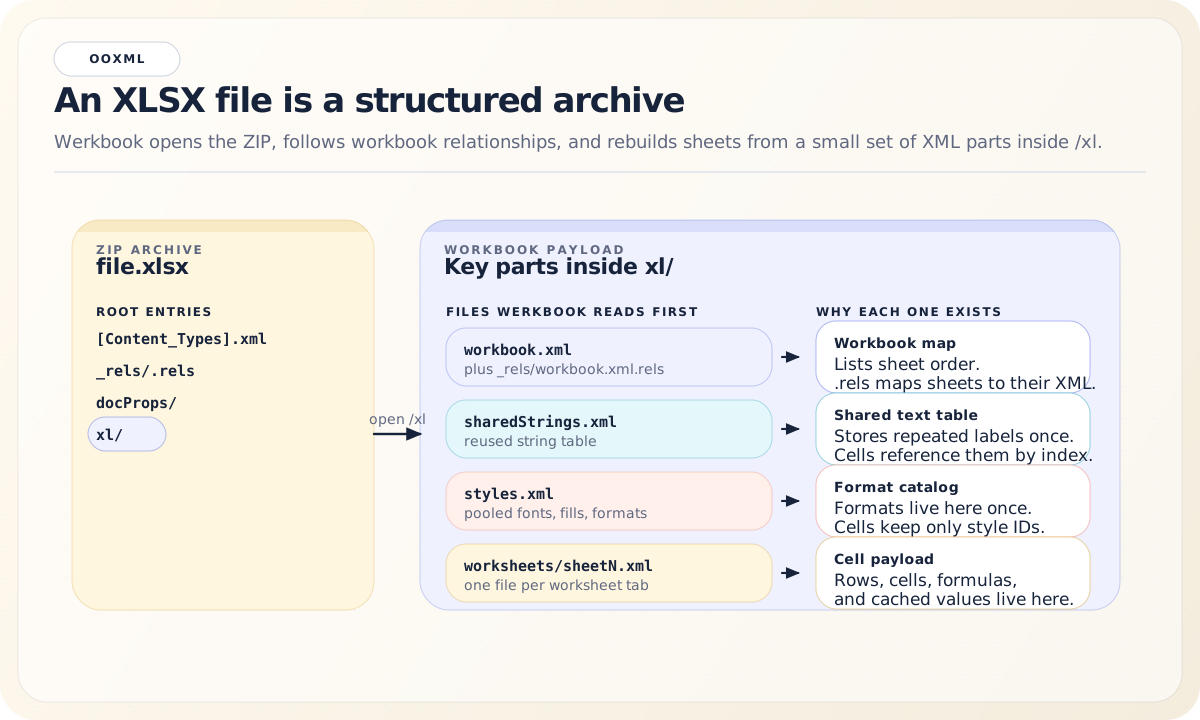
The Shared String Table
One of XLSX’s optimizations is the Shared String Table (SST). Instead of repeating the string “Revenue” in every cell that contains it, the file stores it once in sharedStrings.xml and references it by index:
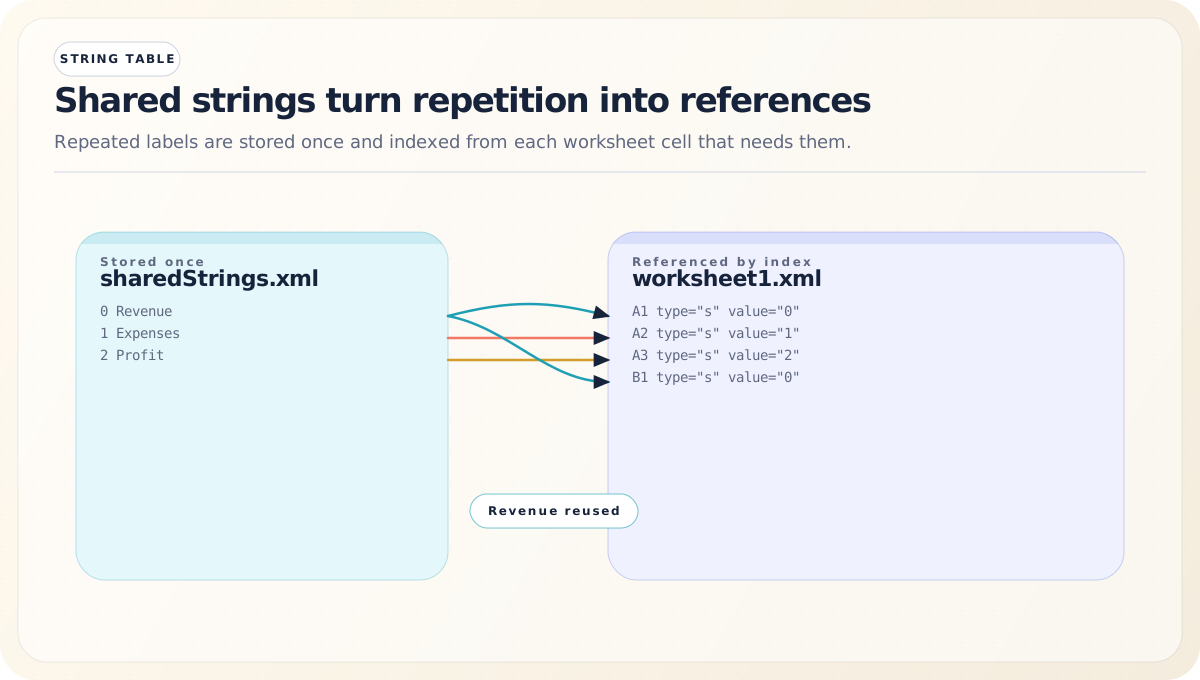
During reading, werkbook resolves these indices back to actual strings. During writing, it builds a new SST by deduplicating all string values across the workbook.
The Reading Pipeline
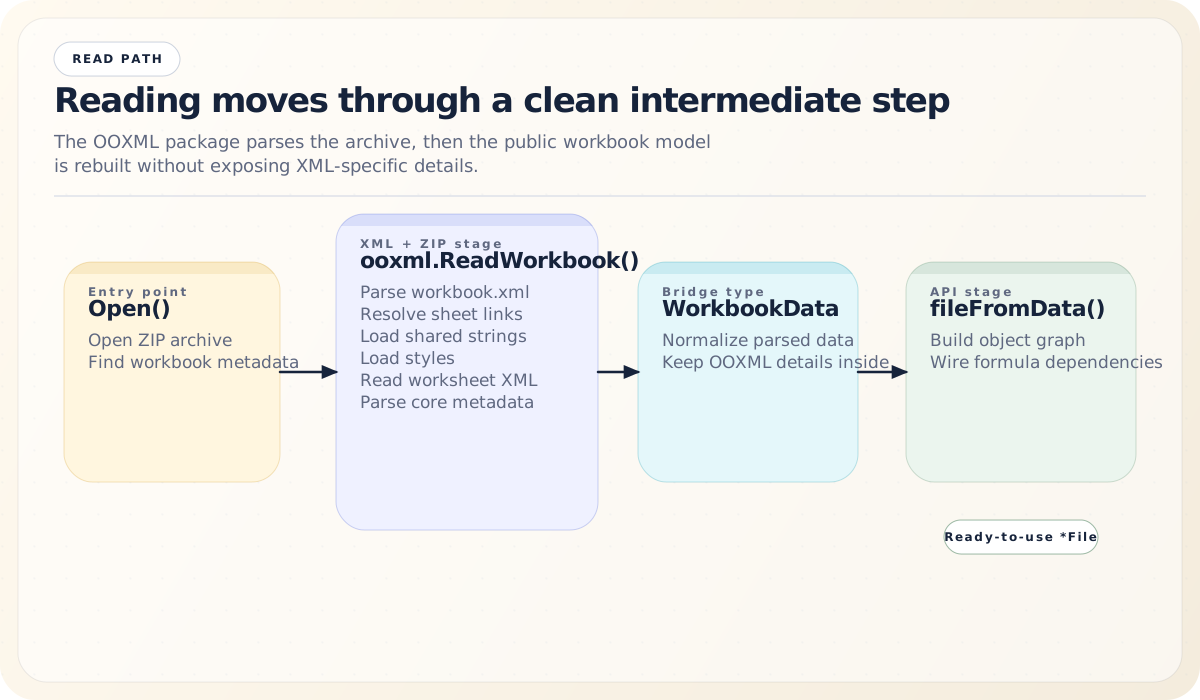
The intermediate WorkbookData type is the bridge between the XML world and the API world. It exists so that the OOXML package never leaks XML-specific details into the public API, and the public API never needs to know about XML namespaces or ZIP entry paths.
Writing XLSX Files: Rebuilding the Archive
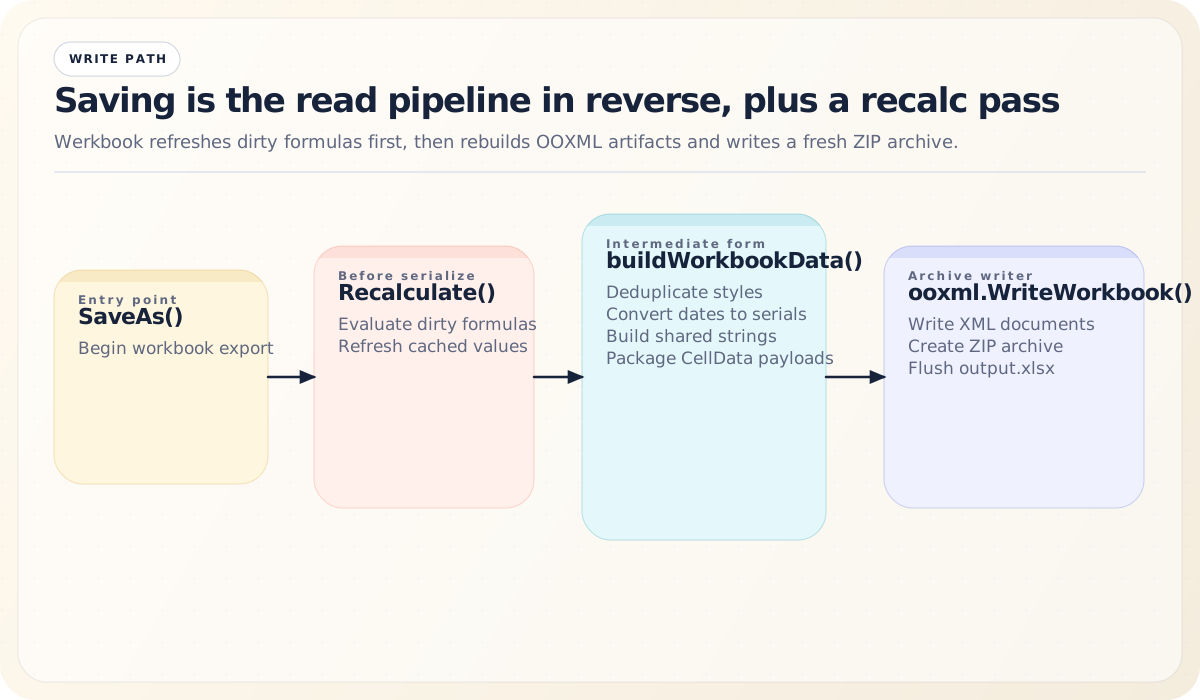
When you call File.SaveAs("output.xlsx"), the process runs in reverse — but with a few important wrinkles.
Formula Recalculation Before Save
Before serializing, werkbook recalculates any dirty formulas. This ensures the saved file contains up-to-date cached values, which is important because some spreadsheet applications (particularly lightweight viewers) don’t have their own formula engines and rely on cached values.
Style Deduplication
XLSX stores styles in a shared pool. If 1,000 cells have bold text, there’s one font definition and 1,000 cells referencing it by index:
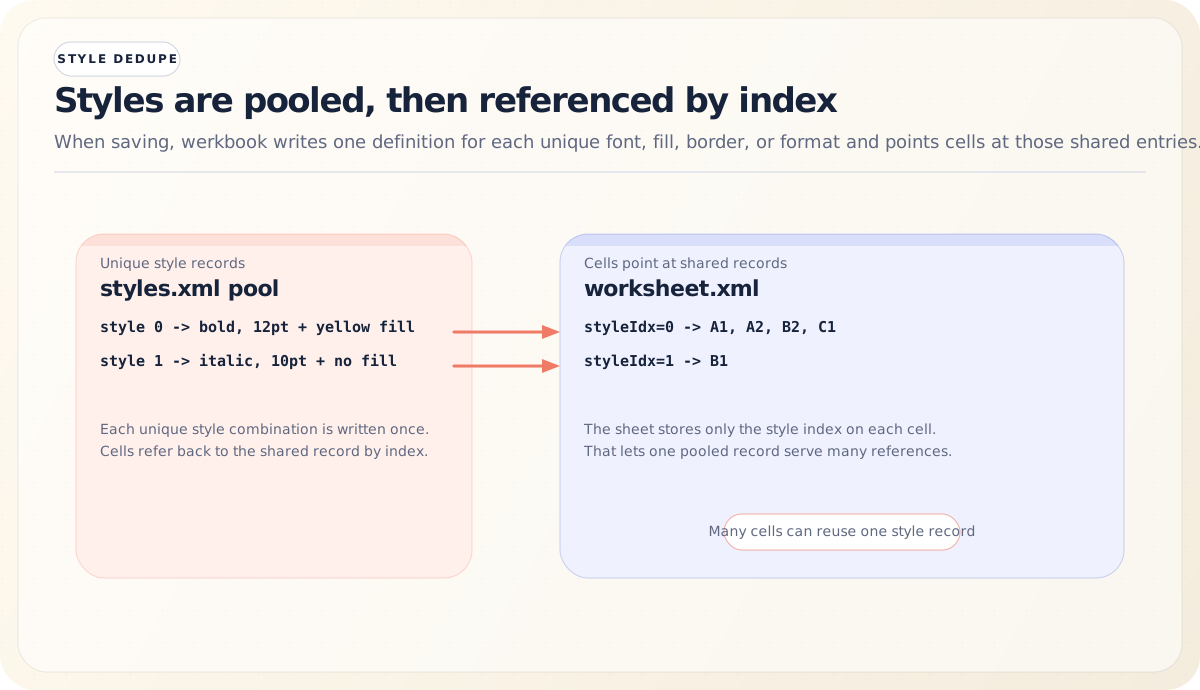
Werkbook handles this deduplication automatically during the write phase: it collects all unique fonts, fills, borders, alignments, and number formats, assigns each an index, and writes cells with references to those indices.
The Writing Pipeline
The Formula Engine: From Text to Bytecode to Results
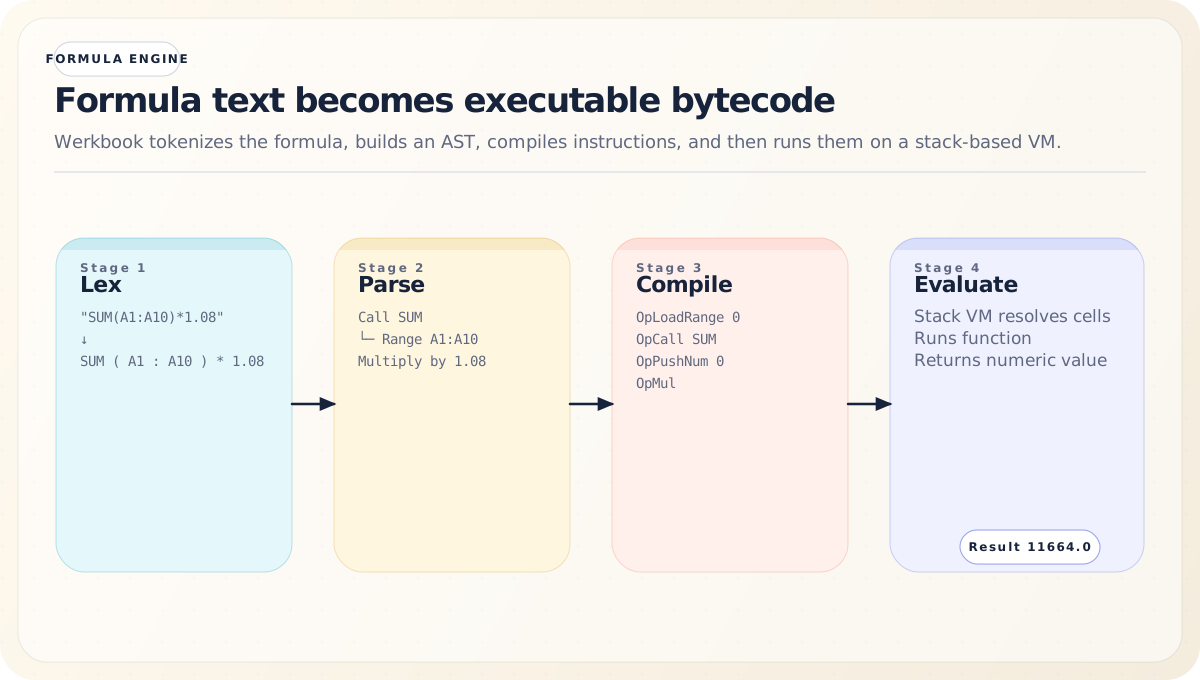
The formula engine is the crown jewel of werkbook. It takes a formula string like SUM(A1:A10)*1.08 and turns it into executable bytecode, evaluates it on a stack-based virtual machine, and returns a result — all while tracking dependencies for incremental recalculation.
The pipeline has four stages: Lexing → Parsing → Compilation → Evaluation.
Stage 1: Lexing
The lexer (formula/lexer.go) transforms a formula string into a stream of tokens. It handles all the quirks of spreadsheet formula syntax:
- String literals:
"Hello, ""World"""(doubled quotes for escaping) - Numbers:
3.14,.5,1E10 - Cell references:
A1,$A$1,Sheet2!B5 - Range references:
A1:C10,Sheet1:Sheet3!A1:B2 - Operators:
+,-,*,/,^,&,=,<>,<,>,<=,>= - Structured references:
Table1[Column],Table1[#Headers] - Parentheses and commas for function calls and grouping
The lexer is careful to distinguish between unary minus (negation) and binary minus (subtraction) based on context — a minus sign at the start of a formula or after an operator is unary.
Here’s what the token stream looks like for a moderately complex formula:
Formula: IF(A1>0, A1*B1, "N/A")

Tokens:  ┌────┐┌───┐┌────┐┌───┐┌───┐┌───┐┌────┐┌───┐┌────┐┌───┐┌───────┐┌───┐
         │ IF ││ ( ││ A1 ││ > ││ 0 ││ , ││ A1 ││ * ││ B1 ││ , ││ "N/A" ││ ) │
         └────┘└───┘└────┘└───┘└───┘└───┘└────┘└───┘└────┘└───┘└───────┘└───┘
Type:    func  open  ref   op   num  sep  ref   op   ref   sep  str     close
Stage 2: Parsing (Pratt Precedence Parser)
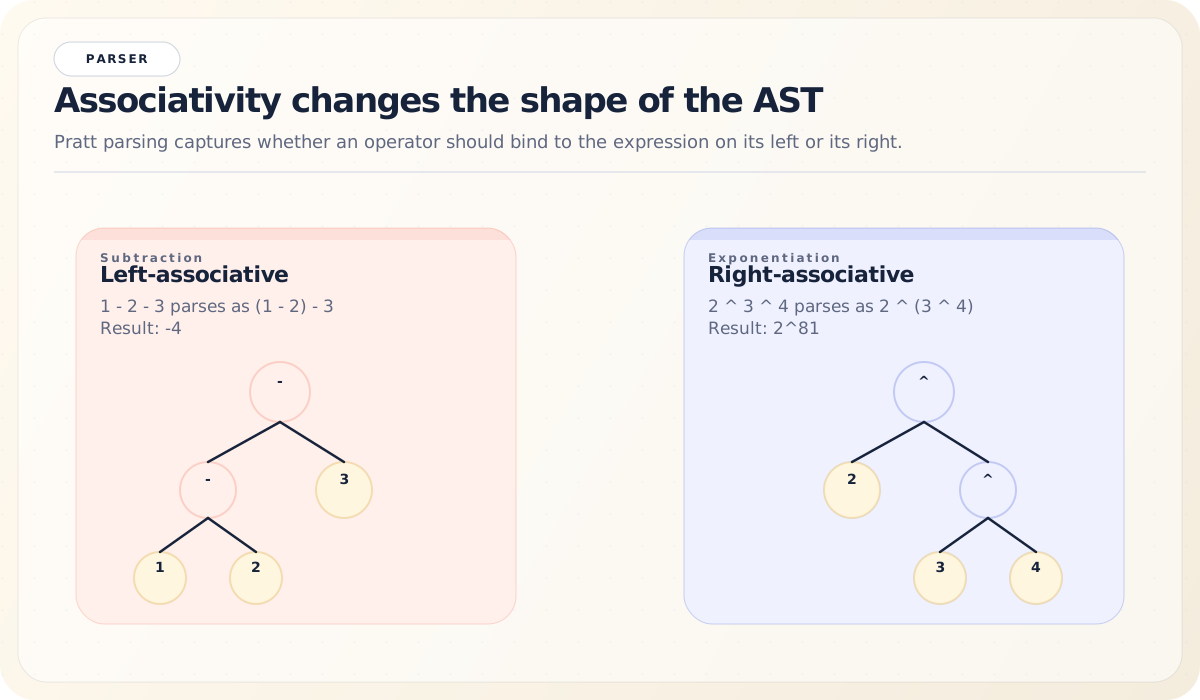
The parser (formula/parser.go) uses a Pratt precedence parser (also known as a top-down operator precedence parser) to build an Abstract Syntax Tree (AST). This approach is elegant because operator precedence and associativity are encoded as binding powers rather than grammar rules:
Precedence levels (lowest to highest):
  2: Comparison  (=, <>, <, >, <=, >=)
  4: Concatenation (&)
  6: Addition/Subtraction (+, -)
  8: Multiplication/Division (*, /)
 10: Exponentiation (^)
 14: Range (:) — highest precedence
The Pratt parser handles left and right associativity naturally. Exponentiation (^) is right-associative (so 2^3^4 means 2^(3^4)), while arithmetic operators are left-associative (so 1-2-3 means (1-2)-3).
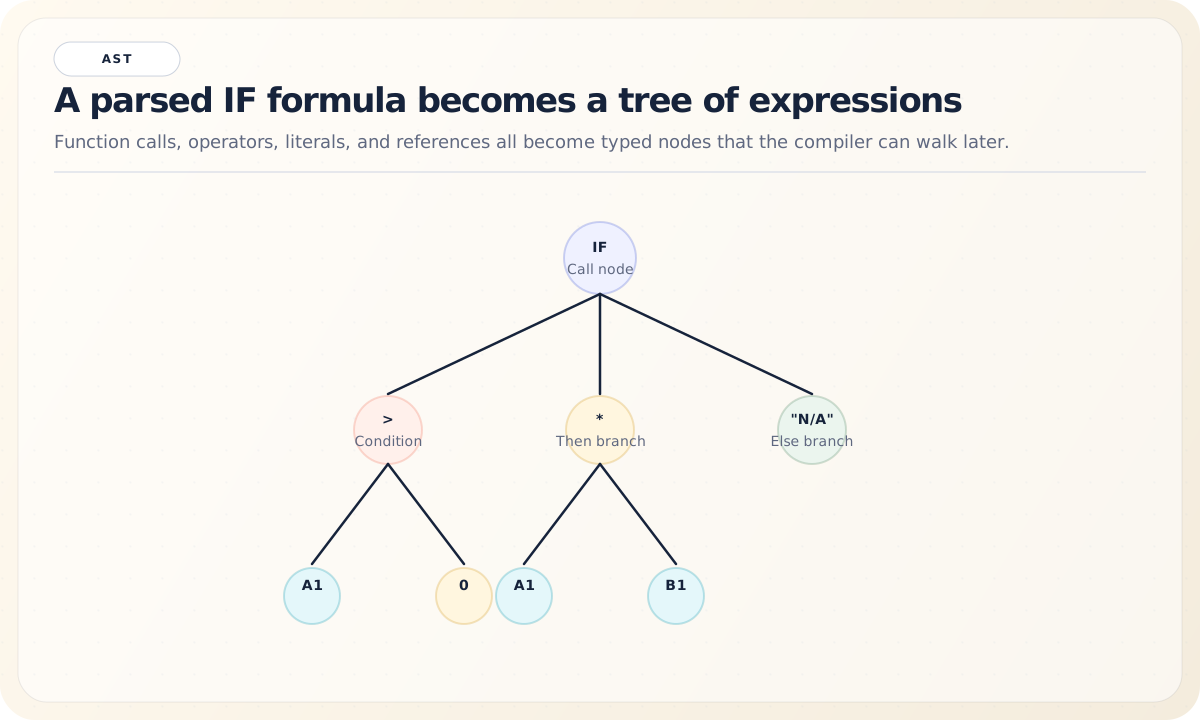
The resulting AST contains node types for:
- Literals: numbers, strings, booleans, errors
- Cell references: single cells and ranges
- Binary operations: arithmetic, comparison, concatenation
- Unary operations: negation, percentage
- Function calls: with argument lists
- Array literals:
{1,2,3;4,5,6}
Here’s a more complex AST example for IF(A1>0, A1*B1, "N/A"):
Stage 3: Compilation (AST to Bytecode)
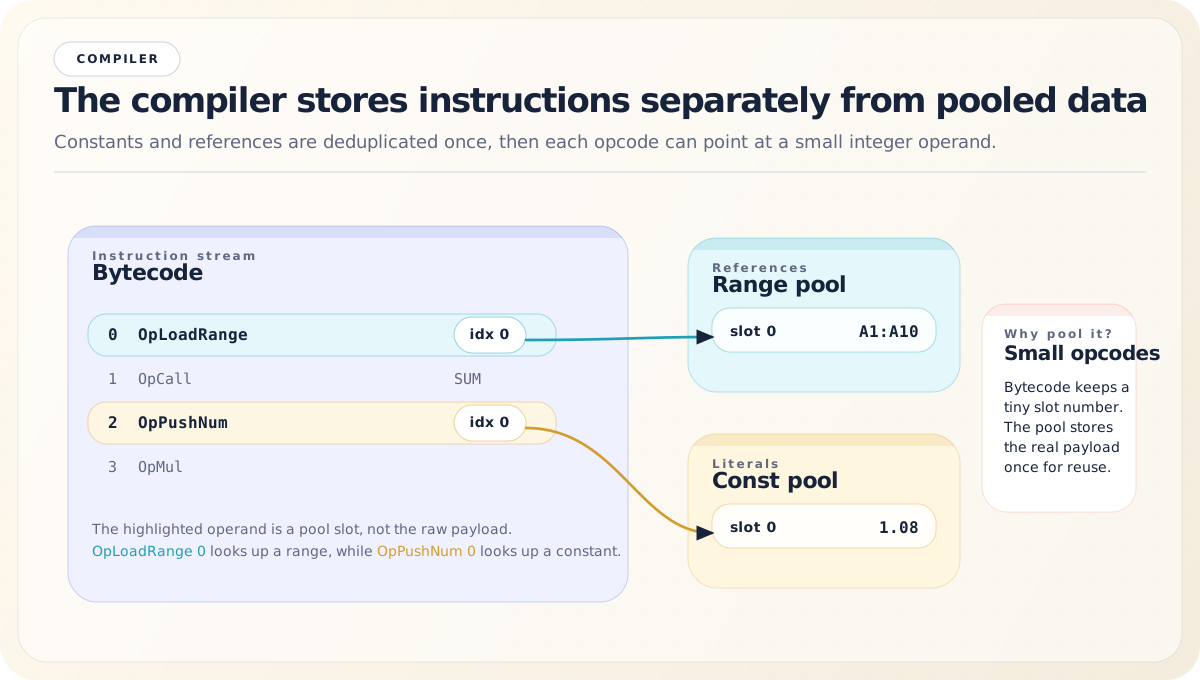
The compiler (formula/compiler.go) walks the AST and emits bytecode instructions. It uses constant pooling and reference deduplication to keep the bytecode compact:
type CompiledFormula struct {
    Source string          // original formula text
    Code   []Instruction   // bytecode
    Consts []Value         // constant pool
    Refs   []CellAddr      // cell reference pool
    Ranges []RangeAddr     // range reference pool
}

type Instruction struct {
    Op      OpCode
    Operand uint32
}
If the same number appears multiple times in a formula, it’s stored once in the constant pool and referenced by index. Same for cell references and ranges.
The full instruction set has 27 opcodes:
| Category | Opcodes |
|---|---|
| Push | OpPushNum, OpPushStr, OpPushBool, OpPushError, OpPushEmpty |
| Load | OpLoadCell, OpLoadRange, OpLoad3DRange, OpLoadCellRef |
| Arithmetic | OpAdd, OpSub, OpMul, OpDiv, OpPow, OpNeg, OpPercent |
| Comparison | OpEq, OpNe, OpLt, OpLe, OpGt, OpGe |
| Other | OpConcat, OpCall, OpMakeArray, OpEnterArrayCtx, OpLeaveArrayCtx, OpRefResultToBool |
For example, the formula SUM(A1:A10)*1.08 compiles to:
Stage 4: Evaluation (Stack-Based Virtual Machine)
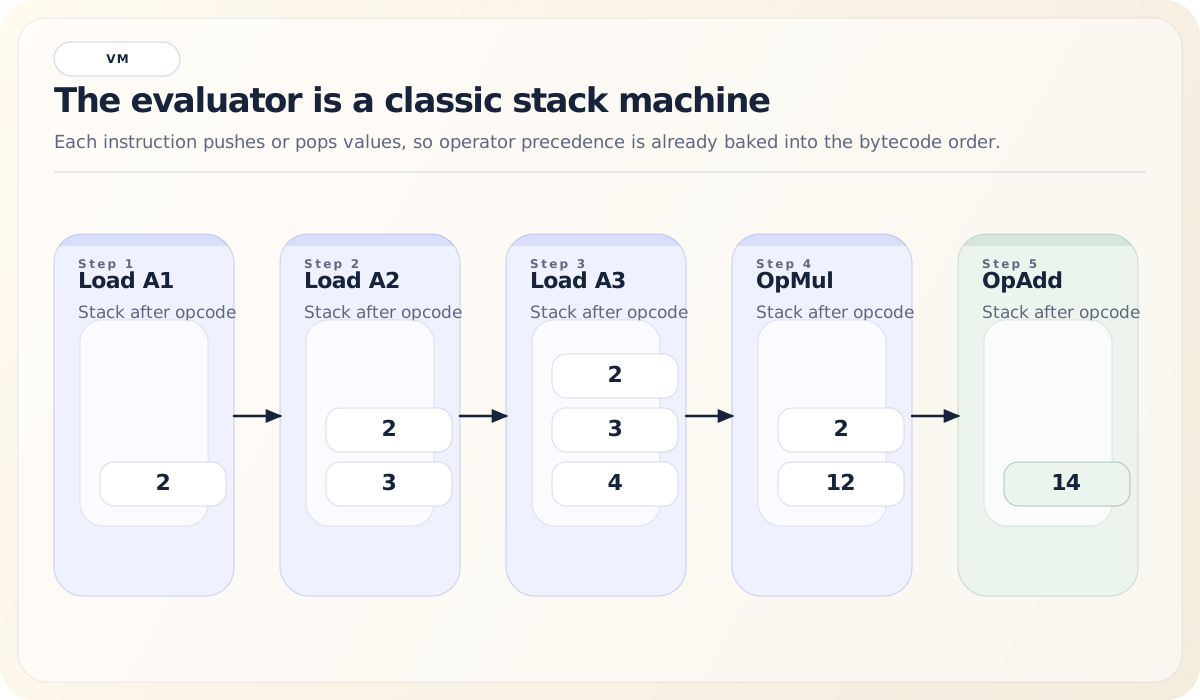
The VM (formula/eval.go) is a classic stack machine. It processes instructions one at a time, pushing and popping values from a stack:
func Eval(cf *CompiledFormula, resolver CellResolver, ctx *EvalContext) (Value, error) {
    stack := make([]Value, 0, 16)
    // ... process each instruction
}
The CellResolver interface is how the VM accesses cell data without depending on the Sheet type directly:
type CellResolver interface {
    GetCellValue(addr CellAddr) Value
    GetRangeValues(addr RangeAddr) [][]Value
}
This separation is key to testability — formula functions can be tested with mock resolvers without creating full workbook structures.
Let’s visualize the VM executing A1+A2*A3 where A1=2, A2=3, A3=4:
The VM also handles some subtle spreadsheet behaviors:
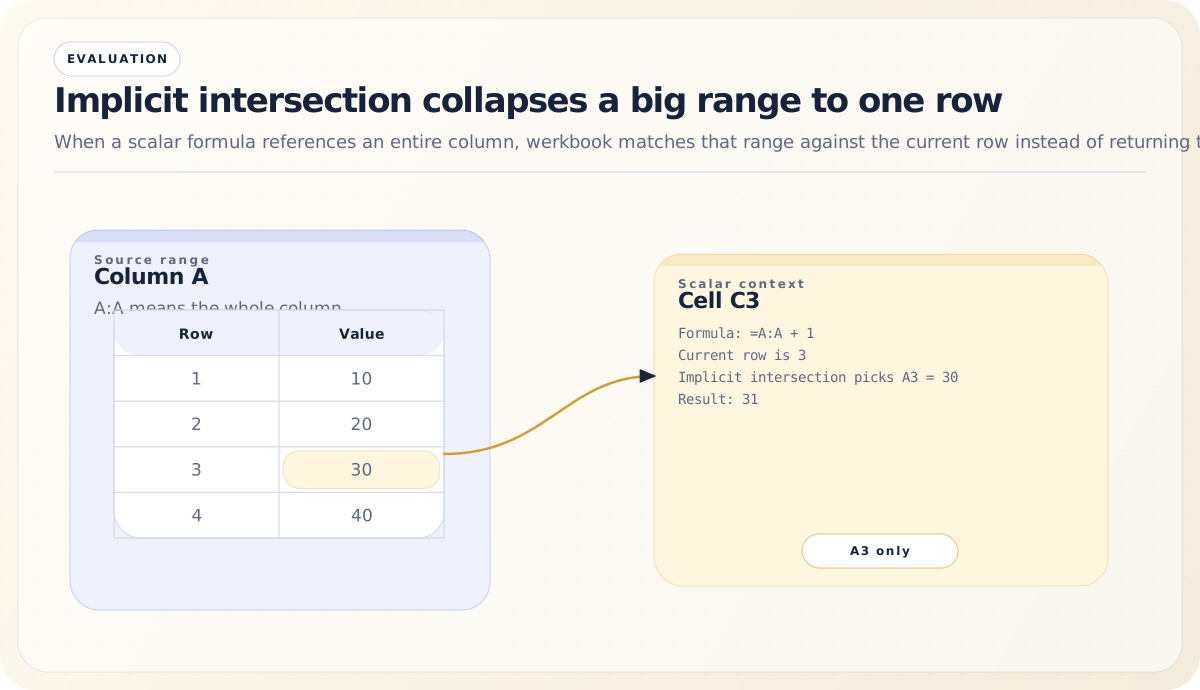
- Implicit intersection: When a formula references an entire column (like
A:A) in a non-array context, the VM intersects it with the current row, returning just the single value at that intersection point.
- Type coercion: Spreadsheet software has complex implicit type conversion rules. In numeric contexts, the string “42” becomes the number 42, and
TRUEbecomes 1. In string contexts, the number 42 becomes “42”. Werkbook faithfully reproduces these rules.
Type Coercion Rules:

  Numeric context (+ - * /)        String context (&)
  ┌───────────┬──────────┐         ┌───────────┬──────────┐
  │ Input     │ Becomes  │         │ Input     │ Becomes  │
  ├───────────┼──────────┤         ├───────────┼──────────┤
  │ "42"      │ 42       │         │ 42        │ "42"     │
  │ "3.14"    │ 3.14     │         │ TRUE      │ "TRUE"   │
  │ TRUE      │ 1        │         │ FALSE     │ "FALSE"  │
  │ FALSE     │ 0        │         │ #N/A      │ #N/A ✗   │
  │ "" (empty)│ 0        │         │ "" (empty)│ ""       │
  │ "hello"   │ #VALUE!  │         └───────────┴──────────┘
└───────────┴──────────┘- Error propagation: Most operations propagate errors — if one operand is
#DIV/0!, the result is#DIV/0!. But some functions (likeIFERROR) intentionally catch errors.
The Function Registry: 438 Functions and Counting
Werkbook supports over 438 spreadsheet functions, organized into categories:
- Math & Trigonometry:
SUM,AVERAGE,ROUND,SIN,COS,LOG,MOD,RAND,CEILING,FLOOR, and many more - Text:
CONCATENATE,LEFT,RIGHT,MID,LEN,FIND,SUBSTITUTE,TRIM,UPPER,LOWER,TEXT - Lookup & Reference:
VLOOKUP,HLOOKUP,INDEX,MATCH,XLOOKUP,XMATCH,OFFSET,INDIRECT - Date & Time:
DATE,TODAY,NOW,YEAR,MONTH,DAY,HOUR,EDATE,EOMONTH,NETWORKDAYS - Logical:
IF,AND,OR,NOT,IFERROR,IFNA,IFS,SWITCH - Statistical:
COUNT,COUNTA,COUNTIF,COUNTIFS,SUMIF,SUMIFS,AVERAGEIF,MEDIAN,STDEV - Financial:
PMT,FV,PV,NPV,IRR,RATE - Information:
ISBLANK,ISNUMBER,ISTEXT,ISERROR,ISFORMULA,TYPE - Engineering:
BIN2DEC,DEC2BIN,HEX2DEC,COMPLEX,IMABS - Array/Dynamic:
SORT,SORTBY,FILTER,UNIQUE,SEQUENCE,RANDARRAY - Web:
ENCODEURL
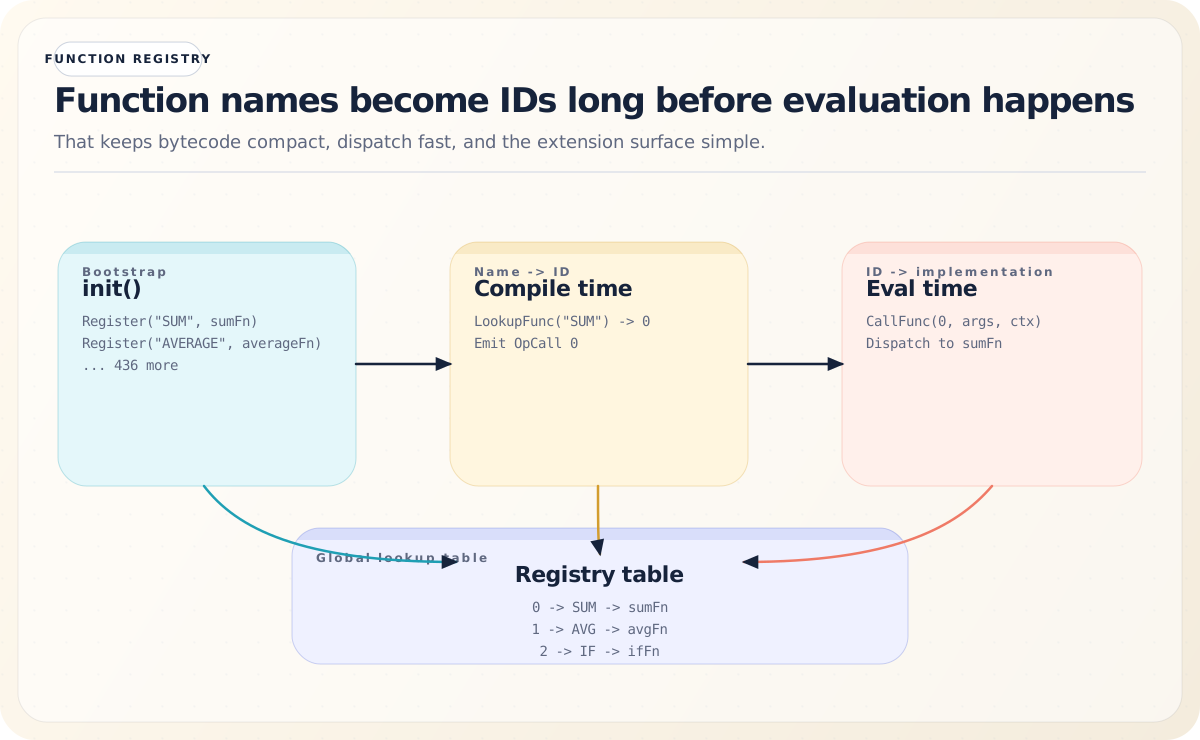
Functions are registered at initialization time using a global registry:
func init() {
    Register("SUM", sumFunc)
    Register("AVERAGE", averageFunc)
    // ... 436 more
}
At compile time, function names are resolved to integer IDs via LookupFunc. At evaluation time, CallFunc dispatches by ID. This design allows:
- Fast dispatch: function calls use integer lookup, not string comparison
- Compact bytecode: function IDs are small integers encoded in the instruction operand
- Extensibility: external packages can register new functions or override existing ones
Dependency Tracking and Incremental Recalculation
One of werkbook’s more sophisticated features is its dependency graph, which enables incremental recalculation. When you change a cell’s value, only the formulas that depend on that cell (directly or transitively) need to be recalculated — not every formula in the workbook.
The Dependency Graph
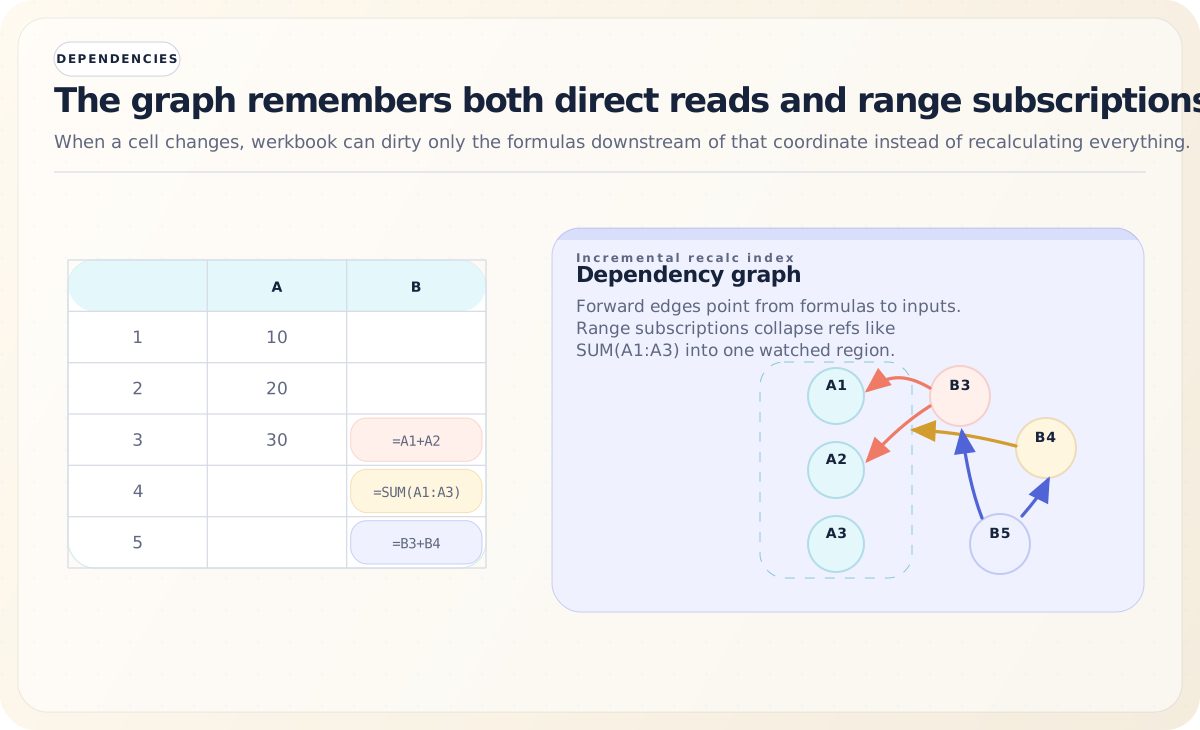
The DepGraph (formula/depgraph.go) maintains bidirectional edges:
type DepGraph struct {
    // forward: formula cell → cells it reads
    dependsOn  map[QualifiedCell]map[QualifiedCell]bool
    // reverse: data cell → formula cells that read it
    dependents map[QualifiedCell]map[QualifiedCell]bool
    // range subscriptions for containment checks
    rangeSubs  []rangeSub
}
There are two types of dependencies:
-
Point dependencies: Cell A5 contains
=A1+A2. The graph records that A5 depends on A1 and A2. If either changes, A5 needs recalculation. -
Range subscriptions: Cell B1 contains
=SUM(A1:A100). Rather than creating 100 individual point dependencies, the graph stores a range subscription. When any cell is modified, the graph checks if it falls within any subscribed range.
Registration
When a formula is compiled, its references are extracted and registered in the dependency graph:
func (g *DepGraph) Register(formulaCell QualifiedCell, owningSheet string,
    refs []CellAddr, ranges []RangeAddr) {
    // Remove old edges first (handles formula changes)
    g.Unregister(formulaCell)

    // Record point dependencies
    for _, ref := range refs {
        // ... build forward and reverse edges
    }

    // Record range subscriptions
    for _, rng := range ranges {
        // ... store range subscription
    }
}
Invalidation
When a cell’s value changes via Sheet.SetValue():
1. Update the cell's value
2. Increment File.calcGen
3. Query DepGraph for all transitive dependents
4. Mark each dependent cell as dirty (cell.dirty = true)
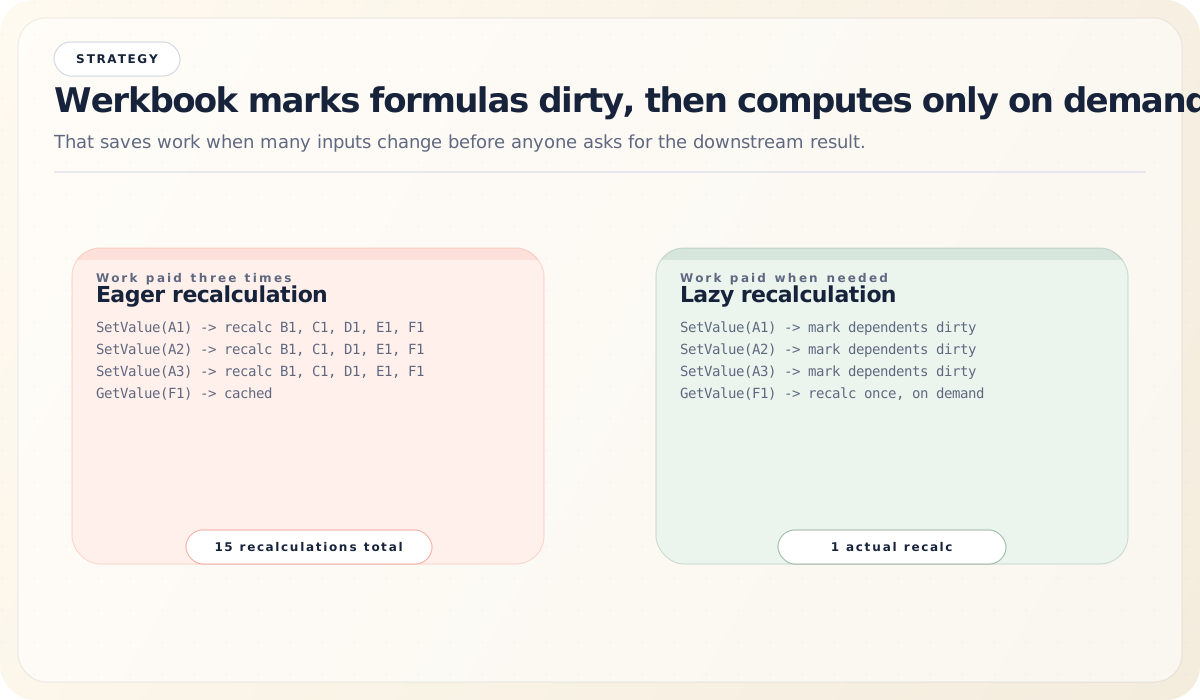
The key insight is that formulas are not immediately recalculated. They’re just marked dirty. The actual recalculation happens lazily when GetValue() is called on a formula cell:
GetValue("A5"):
  if cell.formula != "" && (cell.dirty || cell.cachedGen != file.calcGen):
    result = evaluateFormula(cell)
    cell.value = result
    cell.cachedGen = file.calcGen
    cell.dirty = false
  return cell.value
This lazy approach means that if you change 1,000 cells in a loop, the recalculation cost is paid only for the formulas you actually read afterward — not for every intermediate state.
Circular Reference Detection
Circular references (A1 = B1, B1 = A1) are detected at evaluation time using the evaluating map on the File struct:
if f.evaluating[cellKey] {
    return ErrorValue("#REF!")
}
f.evaluating[cellKey] = true
defer delete(f.evaluating, cellKey)
// ... proceed with evaluation
This is simple and effective. The evaluating map acts as a call stack: if we encounter a cell that’s already on the stack, we’ve found a cycle.
Date Handling: The 1900 Leap Year Bug
Spreadsheet date handling deserves its own section because it involves one of computing’s most famous compatibility bugs.
Spreadsheet files store dates as serial numbers — the number of days since a base date. But there are two date systems:
- 1900 system (default): Day 1 = January 1, 1900
- 1904 system (Mac legacy): Day 1 = January 2, 1904
The 1900 system has a deliberate bug inherited from Lotus 1-2-3: it treats 1900 as a leap year (it wasn’t). February 29, 1900 is serial number 60, even though that date never existed. This means:
- Serial numbers 1–59 (Jan 1 to Feb 28, 1900) are off by zero days
- Serial numbers 60+ are off by one day compared to the mathematically correct calculation
Werkbook faithfully reproduces this bug, because compatibility with existing spreadsheet behavior is more important than mathematical correctness:
1900 Date System — The Leap Year Bug:

Serial#   Spreadsheet shows: Reality:           Notes
──────────────────────────────────────────────────────────────
   1      Jan 1, 1900        Jan 1, 1900        ✓ correct
   2      Jan 2, 1900        Jan 2, 1900        ✓ correct
  ...         ...                ...
  59      Feb 28, 1900       Feb 28, 1900       ✓ correct
  60      Feb 29, 1900       ██ NEVER EXISTED   ✗ phantom date!
  61      Mar 1, 1900        Feb 29... wait,    ← off by one
                              actually Mar 1         from here on
  ...         ...                ...
44927     Dec 31, 2022       Dec 31, 2022       ✓ (bug cancels out)

1904 Date System (Mac):

Serial#   Date               Notes
──────────────────────────────────────────────────────────────
   0      Jan 1, 1904        No leap year bug
   1      Jan 2, 1904        Clean and correct
  ...         ...
The timeToSerialForDateSystem() function handles the conversion between Go’s time.Time and spreadsheet serial numbers, accounting for the appropriate date system and the leap year bug.
Structured References and Tables
Werkbook supports XLSX structured reference syntax, which lets formulas refer to table columns by name:
=SUM(Sales[Revenue])           # Sum the Revenue column of Sales table
=Sales[#Headers]               # Reference the header row
=Sales[[#Data],[Revenue]]      # Data rows of Revenue column
=Sales[@Revenue]               # Current row's Revenue value
Tables are defined with column names, a reference range, and optional features like totals rows:
type Table struct {
    Name      string
    SheetName string
    Ref       string
    Columns   []string
    // ...
}
During formula expansion (before compilation), structured references are resolved to concrete cell ranges. This expansion happens transparently — the formula engine works with regular cell references after expansion.
![Table diagram showing structured references such as Sales[Revenue] expanding to concrete sheet ranges.](/blog/how-werkbook-works/structured-references.svg)
The CLI: wb
Werkbook ships with a command-line tool called wb that exposes the library’s functionality to shell scripts, pipelines, and AI agents.
Commands
wb info file.xlsx                        # Sheet names, dimensions, metadata
wb read file.xlsx                        # Read cell values
wb read file.xlsx --range A1:D10         # Read a specific range
wb read file.xlsx --format json          # JSON output
wb read file.xlsx --format csv           # CSV output
wb read file.xlsx --show-formulas        # Show formula text instead of values
wb edit file.xlsx --patch '[...]'        # Modify cells with a JSON patch
wb create new.xlsx --spec '{...}'        # Create a new workbook from a spec
wb calc file.xlsx                        # Force recalculate all formulas
wb dep file.xlsx                         # Show formula dependency graph
wb formula list                          # List all supported functions
Agent Mode
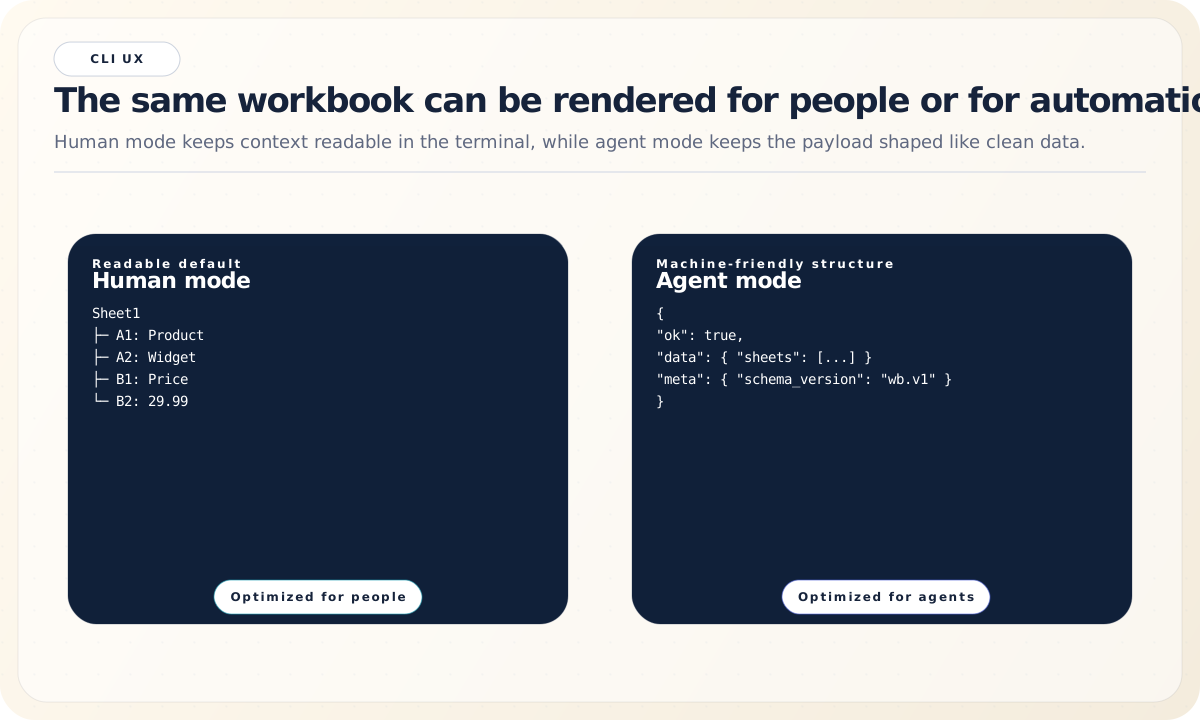
The CLI has an --mode agent flag that wraps all output in a structured JSON envelope, making it easy for AI agents and automated pipelines to parse:
{
  "ok": true,
  "command": "read",
  "data": { "sheets": [...] },
  "meta": {
    "schema_version": "wb.v1",
    "tool_version": "dev",
    "elapsed_ms": 45
  }
}
This is a thoughtful design choice — the same tool serves both humans and machines:
Patch Operations
The edit command accepts JSON patches that describe cell modifications:
[
  {"cell": "A1", "value": "Hello"},
  {"cell": "B2", "value": 42},
  {"cell": "C3", "formula": "SUM(A1:B2)"}
]
Edits are applied atomically — either all patches succeed or the file is left unchanged.
Zero External Dependencies: A Design Philosophy
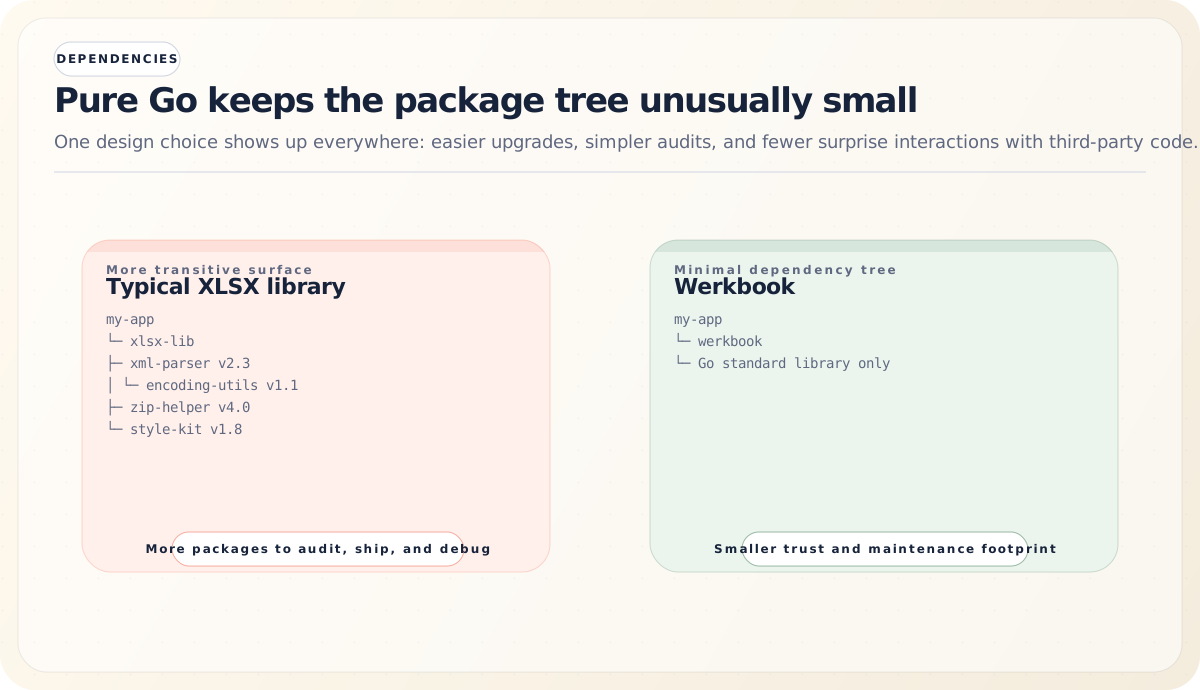
One of werkbook’s most notable characteristics is its complete lack of external dependencies. The entire library is built on Go’s standard library:
archive/zipfor ZIP archive handlingencoding/xmlfor XML parsing and serializationmathfor numerical computationsstrconvfor string/number conversionstimefor date handlingiterfor Go’s range-over-func supportfmt,strings,sort,iofor utilities
This is a deliberate design choice with real benefits:
-
No supply chain risk. No transitive dependencies means no risk of a dependency being compromised, abandoned, or introducing breaking changes.
-
Easy vendoring. The library can be vendored with zero additional effort.
-
Fast compilation. No dependency graph to resolve, no extra packages to download.
-
Predictable behavior. Every line of code that executes is either in werkbook or in Go’s standard library, both of which you can read and reason about.
The tradeoff is that werkbook has to implement everything itself — XML parsing strategies, number formatting, all 438 formula functions. But the result is a library that’s fully self-contained and under complete control.
Testing: Exhaustive by Design
Werkbook’s test suite is massive — over 55 test files with extensive coverage, particularly for the formula engine. The testing strategy is multi-layered:
Formula Function Tests
Each of the 438+ functions has its own test cases, often hundreds per function. These tests use mock resolvers to evaluate formulas in isolation:
// Pseudocode for typical formula test
resolver := mockResolver{
    "A1": 10,
    "A2": 20,
    "A3": 30,
}
result := evalFormula("SUM(A1:A3)", resolver)
assert(result == 60)
Tests cover normal operation, edge cases, error conditions, type coercion, and — critically — spreadsheet parity. The goal is not just mathematical correctness but behavioral compatibility with spreadsheet behavior.
Roundtrip Tests
Roundtrip tests verify that data survives a full create → save → load cycle:
// Create workbook, set values and formulas
wb := werkbook.New()
// ... populate cells
wb.SaveAs("test.xlsx")

// Load it back
wb2, _ := werkbook.Open("test.xlsx")
// ... verify all values match
This catches subtle serialization bugs — missing XML attributes, incorrect escaping, lost styles, broken shared string table references.
Integration Tests
Integration tests exercise the full stack: formulas that reference other formulas, cross-sheet references, multi-step dependency chains, and circular reference detection.
Style Preservation Tests
These verify that cell styles (fonts, colors, borders, number formats) survive serialization and deserialization, and that style deduplication produces correct results.
Performance Considerations
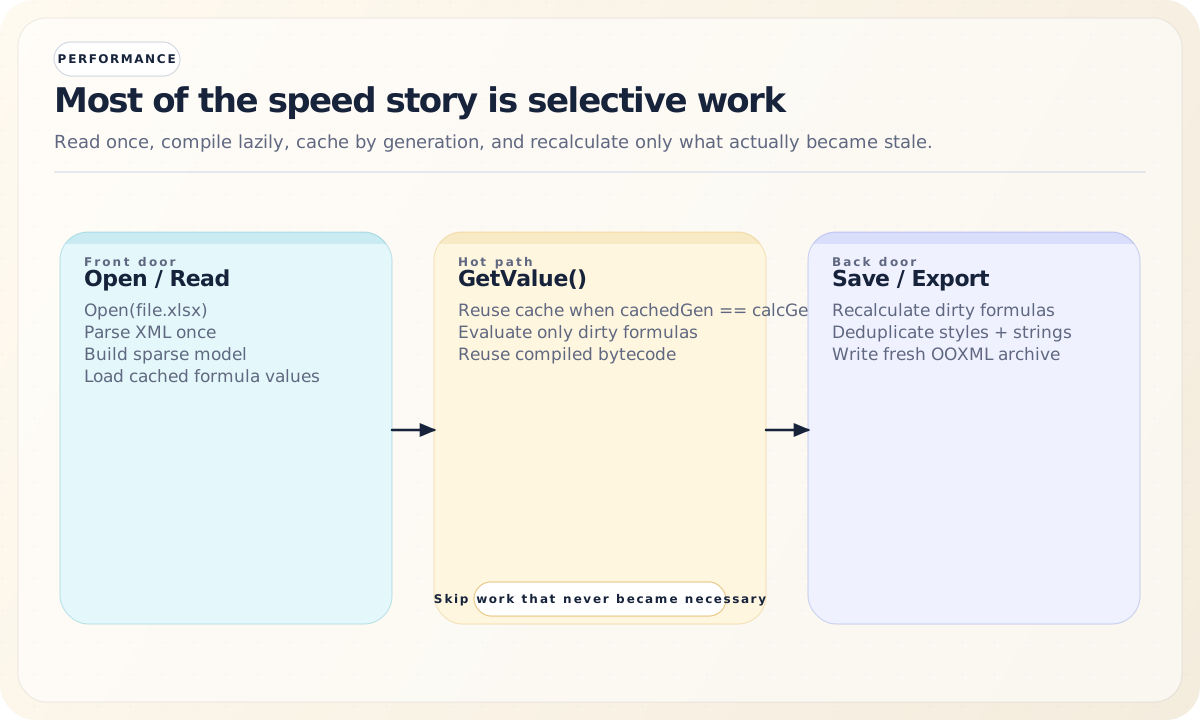
Werkbook makes several design choices that favor performance:
-
Sparse data structures: Maps instead of dense arrays mean memory usage scales with actual data, not with the dimensions of the sheet.
-
Lazy formula evaluation: Formulas are computed on demand, not on load. Opening a large workbook with thousands of formulas is fast because nothing is recalculated until you ask for a value.
-
Bytecode compilation: Formulas are compiled to bytecode once and cached. Subsequent evaluations skip the lex/parse/compile steps entirely.
-
Constant deduplication: The compiler deduplicates constants and cell references in the bytecode, keeping the compiled representation compact.
-
Incremental recalculation: The dependency graph means that changing one cell doesn’t trigger recalculation of every formula — only the transitive dependents.
-
Generation-based caching: The
calcGencounter provides O(1) staleness checking for cached formula values, avoiding timestamp comparisons or hash computations.
Putting It All Together: A Complete Example
Let’s trace through a complete workflow to see how all the pieces fit together:
// 1. Create a new workbook
wb := werkbook.New()
sheet := wb.Sheet("Sheet1")

// 2. Set some values
sheet.SetValue("A1", "Product")
sheet.SetValue("A2", "Widget")
sheet.SetValue("A3", "Gadget")
sheet.SetValue("B1", "Price")
sheet.SetValue("B2", 29.99)
sheet.SetValue("B3", 49.99)
sheet.SetValue("C1", "Qty")
sheet.SetValue("C2", 100)
sheet.SetValue("C3", 50)

// 3. Set formulas
sheet.SetFormula("D1", `"Total"`)
sheet.SetFormula("D2", "B2*C2")
sheet.SetFormula("D3", "B3*C3")
sheet.SetFormula("D4", "SUM(D2:D3)")

// 4. Read a computed value
total, _ := sheet.GetValue("D4")
fmt.Println(total) // 5498.5
The spreadsheet in memory looks like:
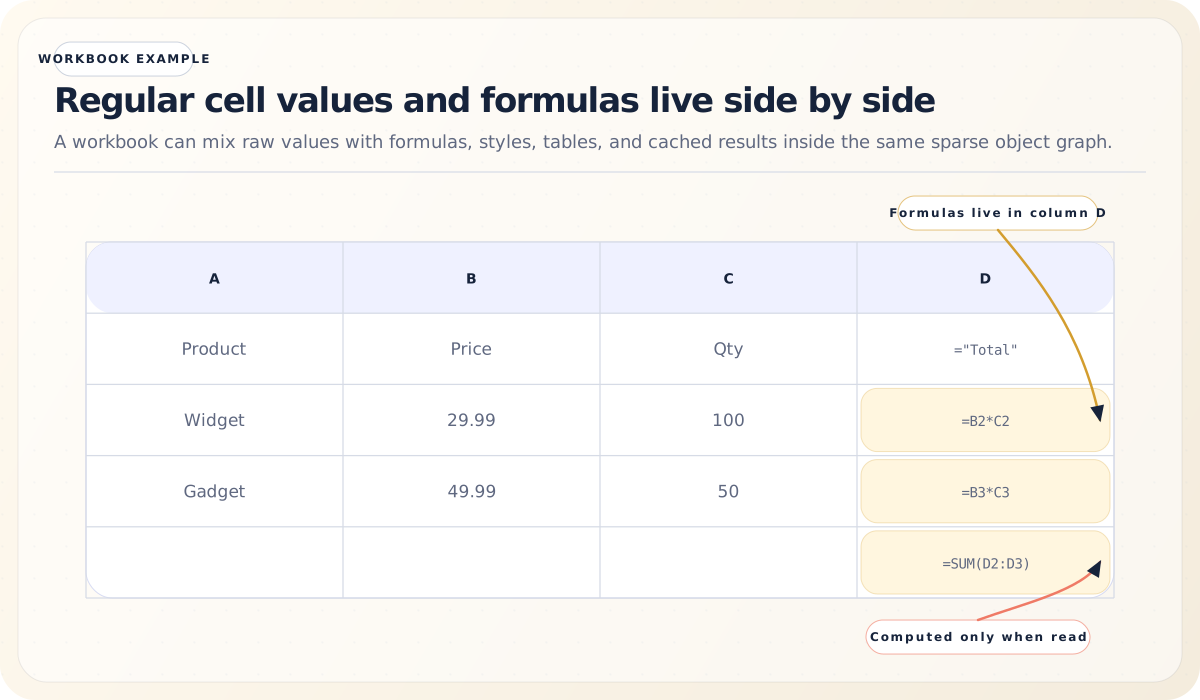
Here’s what happens under the hood when GetValue("D4") is called:
-
Cell lookup: The sheet looks up cell D4 in its sparse map.
-
Staleness check: D4 has a formula and its
cachedGendoesn’t matchfile.calcGen, so it needs evaluation. -
Compilation: The formula
SUM(D2:D3)is lexed, parsed into an AST, and compiled to bytecode:OpLoadRange 0 # Load range D2:D3 OpCall <SUM> # Call SUM -
Dependency registration: The compiler extracts that D4 depends on the range D2:D3, and registers this in the dependency graph.
-
Evaluation: The VM starts executing. When it hits
OpLoadRange, it calls the resolver, which triggers evaluation of D2 and D3 (which are also formula cells):- D2 (
B2*C2): loads B2 (29.99) and C2 (100), multiplies → 2999.0 - D3 (
B3*C3): loads B3 (49.99) and C3 (50), multiplies → 2499.5
- D2 (
-
SUM execution: The SUM function receives the range values [2999.0, 2499.5] and returns 5498.5.
-
Caching: The result is cached in D4’s cell, and
cachedGenis set to the currentcalcGen. -
Subsequent reads: If you call
GetValue("D4")again without modifying any cells, the cached value is returned immediately.
Now if you modify a cell:
sheet.SetValue("C2", 200) // Change Widget quantityThis triggers the following cascade:
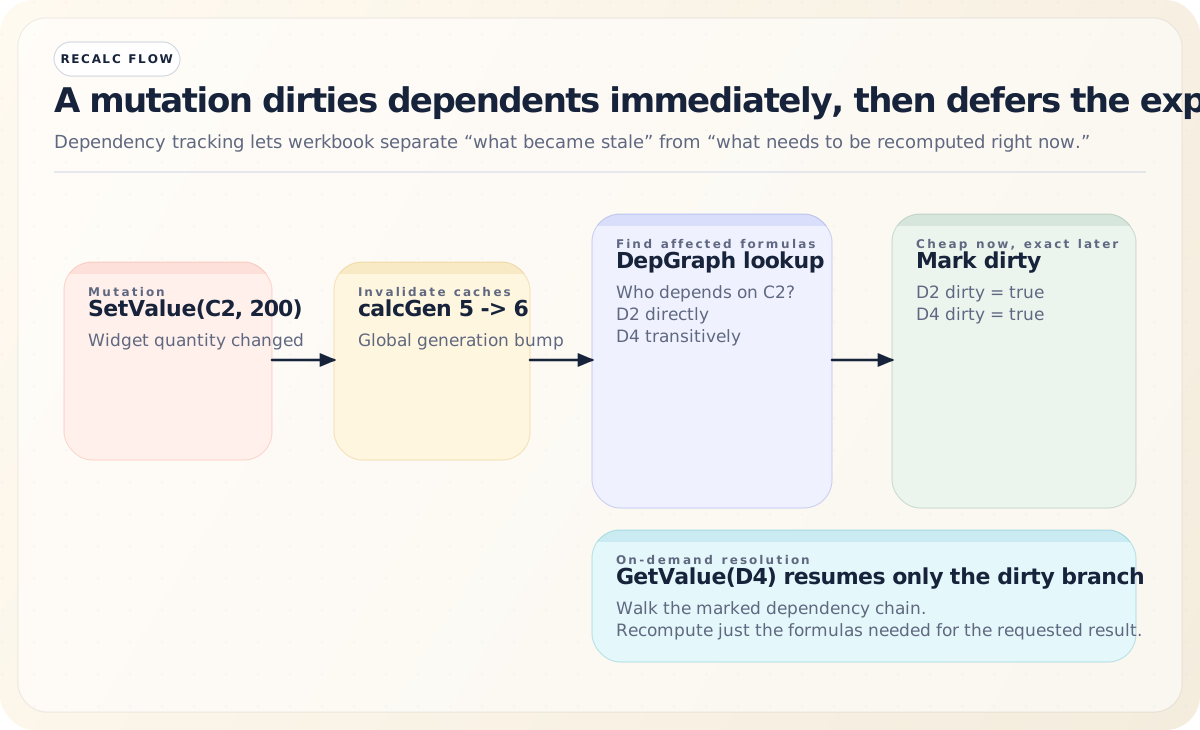
If you read D4 again after that change, D2 recomputes to 5998.0 (29.99 * 200), D3 stays 2499.5, and the new total becomes 8497.5.
Conclusion
Werkbook is more than a file format library. It’s a complete spreadsheet engine implemented in pure Go, with a clean two-layer architecture, a bytecode-compiled formula evaluator, and an incremental recalculation system that handles dependency tracking across sheets and tables.
The design reflects a set of clear priorities: spreadsheet compatibility over theoretical purity (the 1900 leap year bug), laziness over eagerness (formulas computed on demand), and self-containment over convenience (zero external dependencies). The result is a library that’s fast, predictable, and fully self-contained — a solid foundation for any Go application that needs to work with spreadsheets as first-class data structures rather than opaque files.
Whether you’re generating reports, processing financial data, building a spreadsheet-powered API, or automating workflows with the wb CLI, werkbook provides the tools to treat .xlsx files as the structured, computable documents they are.